V Rising Server Configuration: Difference between revisions
Jump to navigation
Jump to search
| Line 2: | Line 2: | ||
Server settings can be changed using [[FTP_Access | FTP]] or using the [[How_to:_Survival_Servers_Control_Panel#Tools|Server Config Tool]]. | Server settings can be changed using [[FTP_Access | FTP]] or using the [[How_to:_Survival_Servers_Control_Panel#Tools|Server Config Tool]]. | ||
===FTP=== | ===FTP=== | ||
#After logging in using FTP, nagivate to '''\VRisingServer_Data\StreamingAssets\Settings''' or use the quick config button in your control panel.<br>[[File:Vrisingftp.png]] | #After logging in using FTP, nagivate to '''\VRisingServer_Data\StreamingAssets\Settings''' or use the quick config button in your control panel.<br>[[File:Vrisingftp.png|700px]] | ||
#Most settings will be managed in '''ServerGameSettings.json''', but occasionally '''ServerHostSettings.json''' will be used. | #Most settings will be managed in '''ServerGameSettings.json''', but occasionally '''ServerHostSettings.json''' will be used. | ||
#After making your changes, save the file and then restart your server so the changes take effect. | #After making your changes, save the file and then restart your server so the changes take effect. | ||
===Server Config Tool=== | ===Server Config Tool=== | ||
#Click on the '''Modify Server Config''' button at the bottom right of your control panel. | #Click on the '''Modify Server Config''' button at the bottom right of your control panel.<br>[[File:Screenshot_2022-05-19_152340.png|300px]] | ||
# | #After making your changes, scroll to the bottom of the server config window and save/restart your server.<br>[[File:V_Rising_Save_Config.png|400px]] | ||
Latest revision as of 11:33, 19 May 2022
Changing Settings
Server settings can be changed using FTP or using the Server Config Tool.
FTP
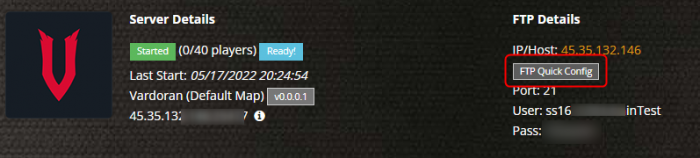
- After logging in using FTP, nagivate to \VRisingServer_Data\StreamingAssets\Settings or use the quick config button in your control panel.
- Most settings will be managed in ServerGameSettings.json, but occasionally ServerHostSettings.json will be used.
- After making your changes, save the file and then restart your server so the changes take effect.

Server Config Tool
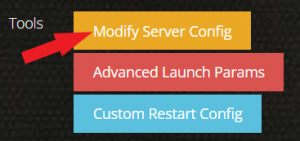
- Click on the Modify Server Config button at the bottom right of your control panel.
- After making your changes, scroll to the bottom of the server config window and save/restart your server.